Speedup
The Speedup tool increases the tempo by a set amount every time the song repeats (or after every n repetitions). This tool is great for building speed on your instrument. Try setting it to 1 BPM or 2 BPM; you’ll barely notice the speed increasing each time, which is a great way to “sneak up” to your top speed.
You’ll find Speedup at the bottom of your screen in the playback bar represented by the :
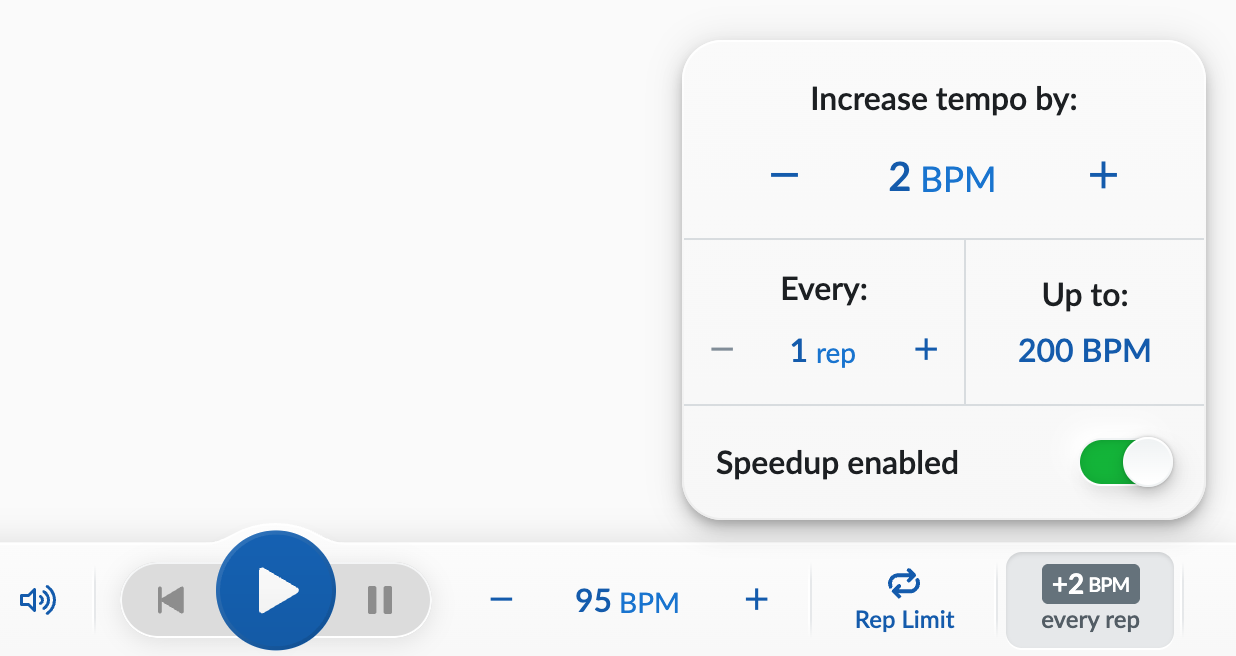
As with the speed controls, you can click the –/+ buttons to change how much the BPM should increase with each speedup, or click on the BPM to type in a new number.
- Turn “Speedup” into “Slowdown” by typing in a negative BPM value.
- Increase the tempo even more gradually by typing in “0.5”
Click on the the –/+ buttons under “Every” to change when the speed increases. For example, you could make it so that the speed stays constant for 4 repetitions, then increases.
Click on “Up to:” if you’d like to only increase the speed to a certain tempo.
Disable Speedup by clicking on the switch in “Speedup enabled”.
If you have set a loop, speedups will be based on repetitions of that loop.
Want the tempo to reset after the song stops? Head over to Playback & BPM settings (which is in the top-right menu in Strum Machine if you have a song open) and enable Reset to previous BPM after stopping. Strum Machine will then set the tempo back to it’s starting value after stopping a song.